
Concept project: fictional business

Know the price first, then book the chair by WhatsApp

Estudio Cirera is a fictional hair and beauty studio in Valencia, Spain, made up to show how we work. Its Spanish and English homepage answers “what will it cost?” and turns the answer into a booking request sent by WhatsApp.

Trade
Salons & barbers
Location
Valencia, Spain
Main goal
Booking requests sent by WhatsApp
Languages
ES / EN

Opens the demo site. It's a fictional business, so forms and buttons won't contact anyone.

The brief

Four stylists and one question: how much?

Estudio Cirera is a made-up studio in Valencia's Ruzafa district: Marta, the founder and colourist, Nadia for curls and brides, Álex for precise cuts and Inés for nails and make-up. In our imagined brief, most new clients find them on Google Maps, then send a WhatsApp to ask what a balayage costs, who they should see and when there's a free slot. Answering takes chair time, and colour clients often go quiet once they hear “it depends”. The site had to answer those three questions on the page, in Spanish and English, and turn the answers into a clear booking request without the salon buying new booking software.

Who the page is for

People in Valencia looking for a colourist, a curly-hair cut or bridal hair, mostly on a phone after finding the salon on Google Maps. Some are newcomers and visitors who read English more easily than Spanish.

Anatomy of the page

Anatomy of a salon homepage that gets chairs booked

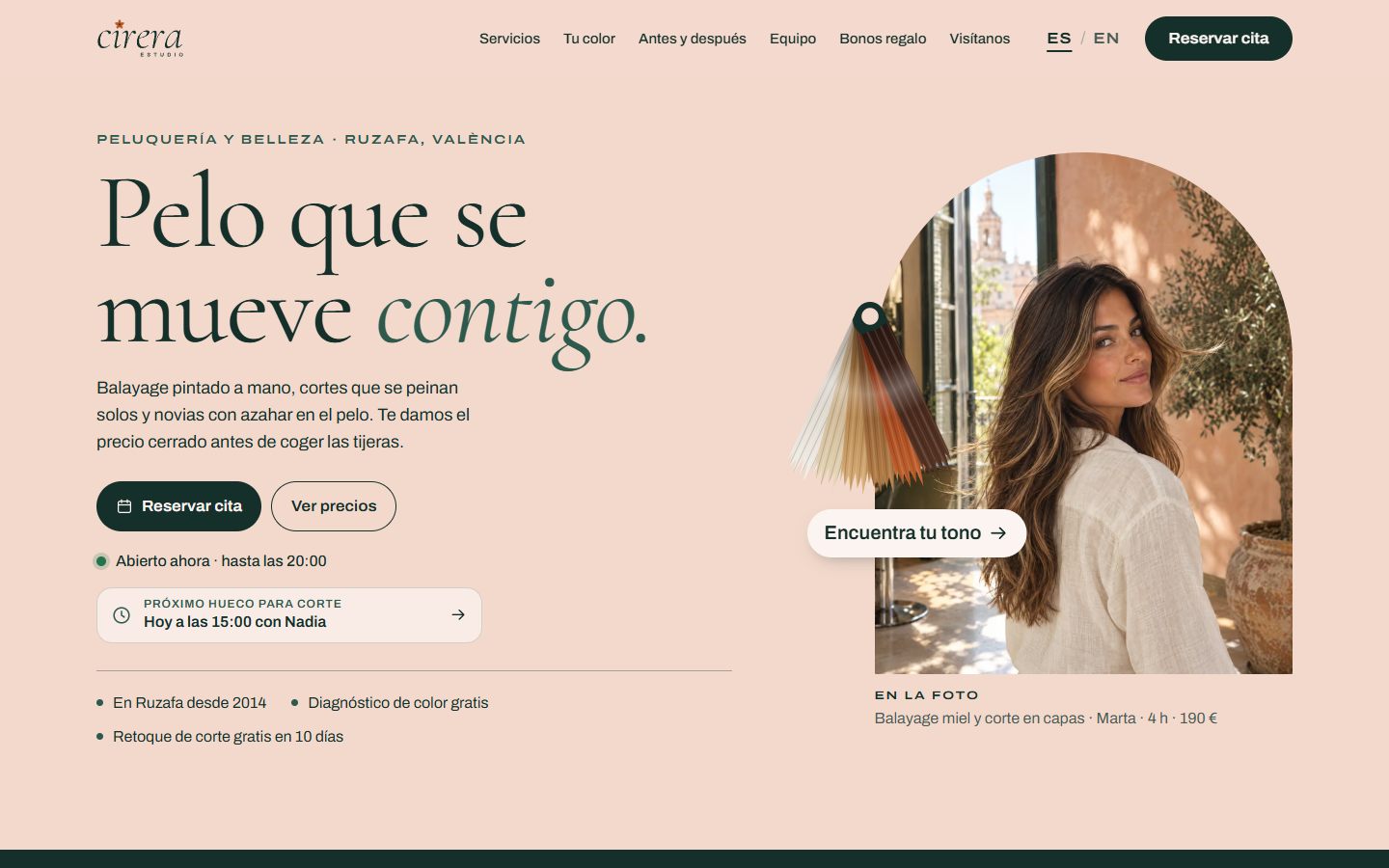
This demo is the homepage of a bigger site, in Spanish and English. Here it is from the top of a phone screen down.

Estudio Cirera — Concept project: fictional business
  1. Headline, a priced photo and the next free slot

    “Hair that moves with you.” sits next to a photo captioned with the service, the stylist, the time and the price: honey balayage and layered cut, Marta, 4 h, €190. Under the two buttons, a live line says whether the studio is open, in Valencia time, and a card shows the next free haircut, for example “Today at 09:30 with Nadia”. One tap on it opens the booking at the last step, with the service, stylist, day and time already chosen.

  2. Four promises, then the full menu

    A dark strip with four promises: a fixed price agreed before starting, a free allergy test 48 hours before a first colour, ten days to come back for a free tweak, and vegan options. Then the menu: 25 services in 6 groups, each with its price, how long it takes and its own “Book” link. On phones the groups are tabs; on a computer they sit side by side in three columns.

  3. The colour chart

    Pick your hair today (4 options) and one of 6 shades, from chocolate to pearl. The result names the service you need, the time in the chair, how many sessions, a “from” price, the upkeep and who does it. “Book this colour” carries that choice into the booking, and a free consultation is one button away.

  4. Before and after, then bridal

    Two photos you drag to compare, each captioned with the service, the stylist, the time and what it cost. A bridal section follows with four prices, from a €75 trial to a €320 package with hair and make-up.

  5. Stylist cards

    Four people, each with a photo, a short line about them, what they're best at and a “Book with…” link that picks them in the booking. On phones the cards sit in a row you swipe sideways.

  6. The five-step booking

    Service, stylist, day, time, then name and mobile. A ticket beside it adds up the choice, the length and the price, and says changes are free up to 24 hours before. The last step writes a WhatsApp message to the studio and shows you a preview of it.

  7. Sample reviews, gift vouchers, visit and FAQ

    Three reviews clearly labelled as sample content, a gift voucher builder with a live preview of the card, the address and opening hours with today highlighted, eight short answers, and a last “Shall we save you a chair?” with booking and WhatsApp buttons.

Why it gets calls and bookings

Five decisions that turn visits into bookings

Every price is on the page

All 25 services show a price and a time. Colour prices say “from”, and a note explains that very long or thick hair costs €10–20 more, agreed before starting. Even the hero and before-and-after photos carry prices. Nobody has to send a message just to find out what something costs.

A colour chart instead of “it depends”

Colour is where people hesitate most, because they can't guess the price. Two taps turn “light brown, want honey” into hand-painted balayage: 3 h 30 min, 1 session, from €145 and a gloss every 10–12 weeks. It's always shown as a guide price, fixed at a free consultation.

Every “Book” link fills in the booking

Menu rows pick the service, stylist cards pick the person, the colour result picks both, and the next-free-slot card picks the service, stylist, day and time. Visitors land on the right step instead of starting again.

Booking ends in WhatsApp, not a form

In our imagined brief, the salon already takes bookings by WhatsApp. So the flow collects the service, stylist, day and time, then writes the message for the client. The salon gets tidy, complete requests without new software. In the demo you only see a preview: nothing is sent.

On a phone, one tap moves you on

Choosing a service, stylist, day or time moves straight to the next step, and the stylist step is skipped when only one person does that service. The bottom bar (Call, WhatsApp, Book) steps aside while you type or use the booking, so it never covers the buttons.

Measured scores

  • 91Performance
  • 100Accessibility
  • 100Best practices

Google Lighthouse, mobile, simulated 4G, measured on 19 September 2026. SEO isn't scored: concept demos are deliberately hidden from Google (noindex), which Lighthouse counts against them. Run it yourself on the live demo.

Build notes

  • Hand-written HTML, CSS and JavaScript with no framework: 86 KB of CSS and JavaScript before compression, 22 KB gzipped. No tracking and no cookies, and nothing typed into the forms leaves the browser.
  • Photos in AVIF with WebP and JPEG fallbacks, in two or three sizes each. Only the hero photo loads straight away; the rest load as you scroll. All photos are AI-generated.
  • Cormorant, an elegant serif, for headings and prices, and Archivo for text. Both are self-hosted (three files, about 160 KB), with no calls to Google Fonts.
  • Cypress green and soft peach, with orange-blossom orange for Valencia's azahar as the accent. The orange is only used on dark green, where its contrast ratio is 6.2:1.
  • Accessibility: the menu tabs and before-and-after sliders work with a keyboard, form errors appear in plain words next to each field, main buttons are 52 px tall, and animations switch off for people who turn on reduced motion.
  • Local Plus package (up to 12 pages in 2 languages): this demo shows only the homepage, in Spanish and English. Local Plus includes online booking, usually by linking the booking app a salon already uses; the colour chart, WhatsApp booking flow and voucher builder are custom extras on top.
Palette
Typefaces
Cormorant + Archivo

The package it represents

Local Plus

This concept is the kind of site you get with Local Plus: £2,490 to build, then from £39/month for care. Interactive extras, such as calculators and estimators, are quoted separately.

Websites for Salons & barbers →

Free homepage preview

Want a site like this for your salon or barbershop?

Tell us about your salon and we'll design your homepage first, free and with no card needed. You only pay if you want to go ahead.

  • No card needed
  • Your domain in your name
  • Cancel care any time after 3 months